IP addresses and DNS
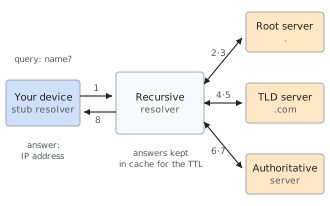
A DNS lookup: the recursive resolver asks the root, the top-level domain and the authoritative server in turn, then keeps the answer in its cache.
IP address Number that identifies a network interface and lets packets be routed to it IPv4 32 bits, written as four decimal numbers: 172.67.204.67IPv6 128 bits, written as eight hexadecimal groups: 2606:4700:3031::ac43:cc43DNS Distributed database that turns names into addresses and other data DNS defined in RFC 1034 and RFC 1035 (1987) DNS transport UDP and TCP port 53; DoT (853), DoH (443) Common records A, AAAA, CNAME, MX, TXT, NS, SOA, HTTPS Security extension DNSSEC (DNSKEY, RRSIG, DS) Typical tools dig,getent,resolvectl,curl -4/curl -6
An IP address is the number that identifies a device’s network interface on the Internet and lets data packets reach it. The Domain Name System (DNS) is the distributed database that translates names that people can remember, such as wiki.daniellomario.com, into IP addresses, and that also stores other information about a domain, for example which servers receive its email.
The two are complementary: IP addresses are what the network actually uses, and DNS is the layer that lets people and programs ignore them. When something “does not load”, the cause is very often one of the two: a name that resolves to the wrong address, an address that is no longer reachable, or a network that supports only one of the two IP versions. This entry explains how both work, using as a running example the real configuration of the domain of this wiki.
IP addresses
The Internet Protocol (IP) moves data in independent units called packets. Every packet carries a source address and a destination address, and every router along the way looks only at the destination to decide where to forward it. An IP address therefore plays the same role as a postal address: it says where something must arrive, not what it contains.
An address identifies a network interface, not a computer: a laptop with Wi-Fi and a VPN has a different address on each interface. It also identifies a position in the network, which is why it changes when the same device moves from home Wi-Fi to mobile data.
Today two versions are in use side by side: IPv4, from 1981,1 and IPv6, designed in the 1990s to solve the shortage of IPv4 addresses.
IPv4
An IPv4 address is a number of 32 bits. To make it readable it is split into four groups of 8 bits, called octets, and each octet is written as a decimal number from 0 to 255, separated by dots (dotted decimal notation):
172.67.204.67 = 10101100 . 01000011 . 11001100 . 01000011
With 32 bits there are
possible addresses, about 4.3 billion: fewer than the people on Earth, and far fewer than the connected devices. The central registry, IANA, handed out its last free blocks on 3 February 2011,2 and the regional registries ran out in the following years (the European one, RIPE NCC, on 25 November 2019).3 Since then IPv4 addresses are reused, shared through NAT and traded.
Address classes
In the original design an address was divided into a network part, which identifies the network, and a host part, which identifies the interface within that network. Where the boundary fell was encoded in the first bits of the address, which defined the class:1
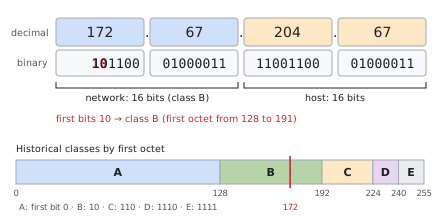
Figure 1. The address 172.67.204.67 in decimal and binary. Its first two bits are 10, so in the class system it is a class B address: 16 bits of network and 16 bits of host. Below, the classes as ranges of the first octet.
| Class | First bits | First octet | Network / host bits | Networks | Addresses per network |
|---|---|---|---|---|---|
| A | 0 | 0–127 | 8 / 24 | 128 | 16 777 216 |
| B | 10 | 128–191 | 16 / 16 | 16 384 | 65 536 |
| C | 110 | 192–223 | 24 / 8 | 2 097 152 | 256 |
| D | 1110 | 224–239 | — | — | multicast |
| E | 1111 | 240–255 | — | — | reserved |
A class B address has the first two bits fixed at 10. This leaves 14 bits to number the networks ( networks) and 16 bits for the hosts ( addresses, of which 65 534 usable, because the all-zeros and all-ones host values are reserved for the network itself and for broadcast). Recognizing the class from the decimal form only requires the first octet: if it is between 128 and 191 the address is class B. The address 172.67.204.67, one of those of this wiki, is therefore class B: starts with 10. The other address of the same site, 104.21.74.163, is class A, because starts with 0.
The class system wasted space: an organization that needed 300 addresses was too big for a class C (256) and received a class B (65 536), leaving almost all of it unused. For this reason classes were abolished in 1993 and replaced by CIDR.4 The names have survived in everyday language, in particular “class A, B or C private network” for the private ranges (see below), but today the class of an address has no technical meaning: the two addresses above, one “class A” and one “class B”, belong to the same company and are used in exactly the same way.
CIDR and subnet masks
With CIDR (Classless Inter-Domain Routing)5 the boundary between network and host can fall after any bit, and it is written explicitly after a slash: the prefix length. A block with prefix contains
addresses. The same information can be written as a subnet mask, a 32-bit number with ones followed by zeros: /24 corresponds to 255.255.255.0.
| Block | Prefix | Mask | Addresses | Example |
|---|---|---|---|---|
172.64.0.0/13 | 13 | 255.248.0.0 | 524 288 | a block announced by Cloudflare, which contains 172.67.204.67 |
172.67.0.0/16 | 16 | 255.255.0.0 | 65 536 | what the old class B network would have been |
192.168.1.0/24 | 24 | 255.255.255.0 | 256 | a typical home network |
104.21.74.163/32 | 32 | 255.255.255.255 | 1 | a single address |
The /13 block in the first row is wider than a class B and does not start at a class boundary: this is exactly what classes could not express.
Blocks of addresses are assigned to organizations that operate their own network, called autonomous systems and identified by a number (ASN). Cloudflare, for example, is AS13335 and the Internet Archive is AS7941. The autonomous systems tell each other which blocks they can reach with the BGP protocol, and this is how a router in Italy knows where to send a packet addressed to 104.21.74.163. Because the ASN describes who operates an address, a firewall rule can block a whole organization by its AS number rather than by a list of addresses.
Special ranges
Some blocks are reserved and never appear as destinations on the public Internet:
| Block | Use | Where it shows up |
|---|---|---|
10.0.0.0/8, 172.16.0.0/12, 192.168.0.0/16 | private addresses6 | home and company networks; often called the “class A, B and C” private networks |
100.64.0.0/10 | shared address space for carrier-grade NAT7 | operators’ internal networks; also used by Tailscale (for example 100.100.100.100, its DNS resolver) |
127.0.0.0/8 | loopback | 127.0.0.1 is the machine itself |
169.254.0.0/16 | link-local8 | automatic addresses without DHCP; 169.254.169.254 is the metadata and DNS service of many cloud providers |
192.0.2.0/24, 198.51.100.0/24, 203.0.113.0/24 | documentation9 | examples in books and manuals, like the ones in this entry |
The private range 172.16.0.0/12 covers exactly 16 old class B networks, from 172.16.x.x to 172.31.x.x. The address 172.67.204.67 is outside it, and is in fact public.
Network address translation
Because public IPv4 addresses are scarce, a home network normally receives one public address, assigned to the router, and the devices inside use private addresses such as 192.168.1.23. The router performs network address translation (NAT): it rewrites the source address of outgoing packets with its own and remembers which internal device each connection belongs to, so that it can deliver the replies. From outside, all the devices of the house appear as one address. NAT saved IPv4 from running out much earlier, but it makes it hard to reach a device inside the network from outside, which is the problem that tools such as Tailscale and Cloudflare Tunnel work around.
IPv6
An IPv6 address has 128 bits,10 so there are
addresses, enough never to need NAT. It is written as eight groups of 16 bits in hexadecimal, separated by colons, with two abbreviations:11
- the leading zeros of each group can be omitted (
0db8→db8); - one run of consecutive all-zero groups can be replaced by
::.
2606:4700:3031:0000:0000:0000:ac43:cc43   full form
2606:4700:3031::ac43:cc43                 compressed form
The :: can appear only once, otherwise it would be ambiguous how many zero groups each one stands for. A curiosity of this specific address: its last 32 bits, ac43:cc43, are the bytes ac 43 cc 43, that is 172.67.204.67, the IPv4 address of the same site. It is a choice of Cloudflare, not a rule of IPv6.
The main IPv6 ranges are:12
| Prefix | Type | Example |
|---|---|---|
2000::/3 | global unicast: public addresses | 2606:4700:3031::ac43:cc43 (Cloudflare holds 2606:4700::/32) |
fc00::/7 | unique local addresses (in practice fd00::/8), the IPv6 equivalent of private addresses | Tailscale uses fd7a:115c:a1e0::/48 |
fe80::/10 | link-local: valid only on the local link, every interface has one | fe80::1c2b:… on the Wi-Fi |
::1/128 | loopback | the machine itself |
2001:db8::/32 | documentation9 | examples |
Dual stack and Happy Eyeballs
The two versions are not compatible: an IPv4-only device cannot talk directly to an IPv6-only one. The transition therefore happens through dual stack: networks and servers use both, and a name can have both an IPv4 and an IPv6 address. When a client has both, the Happy Eyeballs algorithm13 starts with IPv6, and if it does not get a connection within a short delay (250 ms is the recommended value) it tries IPv4 in parallel, keeping whichever answers first.
A home network can lack IPv6 entirely: this depends on the Internet provider and on the router, not on the computer, which has supported IPv6 for decades. On Linux it can be seen with ip -6 route: if the only addresses are fe80:: (link-local) and those of a VPN, there is no route to the IPv6 Internet. In this situation clients still receive the IPv6 addresses of sites from DNS, try them and fall back to IPv4. This normally costs nothing, but a misconfigured network, or a browser that first tries newer protocols on IPv6, can show occasional delays or failures that do not happen with IPv4 only. The quickest test is to compare curl -4 and curl -6 on the same site.
Anycast
Usually an address corresponds to one place. With anycast, instead, the same block is announced via BGP from many places at once, and every packet reaches the nearest one. Content delivery networks such as Cloudflare work this way: 104.21.74.163 is answered by hundreds of data centers, and the same addresses serve many different sites, distinguished by the name the browser asks for. For this reason the IP address of a site behind such a network says where the network is, not where the site’s own server is.
Domain Name System
Before DNS, the names of the few hundred machines on ARPANET were kept in a single file, HOSTS.TXT, maintained centrally and copied by everyone. The file grew too fast to be managed that way, and in 1983 Paul Mockapetris proposed the Domain Name System,14 whose current definition dates back to 1987.1516 A trace of the old method survives in the /etc/hosts file, which systems still read before asking DNS.
Names and hierarchy
A domain name is a sequence of labels separated by dots and read from right to left, from the most general to the most specific:
wiki . daniellomario . com . (root)
- the root is the empty label at the far right; the fully qualified form of a name ends with a dot:
wiki.daniellomario.com.; comis a top-level domain (TLD); others areit,orgordev;daniellomariois the second-level domain, the part that is registered;wikiis a subdomain, which the owner can create freely.
Each label can be up to 63 characters long. The tree is divided into zones, parts managed by different organizations. The root zone delegates com to the servers of the company that manages it, and com delegates daniellomario.com to the servers chosen by its owner. Delegation is the reason DNS scales: no server knows everything, but every server knows whom to ask.
Two roles that are often confused take part in this:
- the registrar is the company where the domain is bought and renewed; it writes into the TLD zone which name servers are responsible for the domain;
- the DNS provider runs those name servers and holds the actual records.
They can be the same company or two different ones. Moving a domain to another DNS provider means changing the name servers at the registrar; the example below shows what can happen in the meantime.
Resolution
Three kinds of software take part in turning a name into an address:
- the stub resolver, inside the operating system of the device (on Linux, for example,
systemd-resolved), which does not resolve anything itself but forwards the question; - the recursive resolver, which does the actual work and keeps a cache: the one of the provider or of the router, or a public one such as
1.1.1.1(Cloudflare) or8.8.8.8(Google); - the authoritative servers, which hold the records of a zone and answer only for it.
Starting from an empty cache, the steps are those of the figure in the infobox:
- the device asks the recursive resolver for the address of
wiki.daniellomario.com; - the resolver asks a root server, which does not know the answer but replies with the servers of
com; - it asks a server of
com, which replies with the servers ofdaniellomario.com(herealbert.ns.cloudflare.comandkayleigh.ns.cloudflare.com); - it asks one of these authoritative servers, which finally replies with the address;
- the resolver returns the address to the device and keeps every answer in its cache.
There are 13 root server identities, named from a.root-servers.net to m.root-servers.net and run by 12 organizations;17 thanks to anycast each of them is in reality a large number of servers spread around the world. In practice steps 2 and 3 almost never happen: the addresses of the com servers are in the cache of every resolver, and the work is limited to the last step or to nothing at all.
Caching and TTL
Every record carries a TTL (time to live), the number of seconds for which it can be kept in a cache. During that time resolvers answer from memory without asking the authoritative servers again. It is what makes DNS fast and light, and it is also why changes are not instant.
Some values from the domain of this wiki, measured with dig:
| What | TTL | Meaning |
|---|---|---|
| A and AAAA records of the site | 300 s | an address change is seen by everyone within 5 minutes |
| NS records in the zone | 86 400 s | a day |
delegation in the com zone | 172 800 s | two days: the time a resolver can keep asking the old name servers after a change |
| negative answers | 1 800 s | how long a “this record does not exist” is remembered |
Even the fact that a record does not exist is cached (negative caching).18 Its duration is the smaller of the TTL of the zone’s SOA record and the last field of that record, here both 1 800 seconds. This means that querying a name before creating the record can “poison” the answer for half an hour: the record now exists, but the resolver keeps replying that it does not.
What is commonly called DNS propagation is not something that travels: it is the time it takes for the old copies in the caches of all resolvers to expire.
An example: a stale answer after moving name servers
This is a common situation, which happened while this wiki was being set up. The addresses below are documentation examples.
- The domain was registered at a company that also provided DNS, and there the name
wikihad an A record pointing to an old server,203.0.113.10. - The site was moved behind Cloudflare and the name servers at the registrar were changed to Cloudflare’s, where
wikihas the new addresses. - For up to two days (the TTL of the delegation) some resolvers kept using the old name servers stored in their cache, and those still answered with
203.0.113.10. - The old server no longer accepted connections on port 443, so for those users the browser showed “connection failed”, while for everyone else the site worked.
The fix was to delete the old record at the previous provider. Two rules come out of it: when moving DNS, empty or align the old zone, and for planned changes lower the TTLs a few days in advance.
Transport and privacy
Classic DNS travels unencrypted over UDP port 53, falling back to TCP for large answers: anyone on the network path can read which names a device looks up, and in principle alter the answers. Two standards encrypt the traffic between the device and the resolver:
- DNS over TLS (DoT), on port 853;19
- DNS over HTTPS (DoH), which hides the queries inside ordinary HTTPS traffic on port 443.20
Browsers can use DoH on their own, bypassing the system resolver. In Firefox the feature is called Trusted Recursive Resolver; its strictest mode (“max protection”, mode 3 in about:networking#dns) uses only the DoH resolver, with no fallback to the system one. It gives more privacy, but also means that the browser and the rest of the system can see different answers or behave differently on the same network. Encryption protects the path to the resolver, not the content of the answers: that is the job of DNSSEC.
Resource records
The data of a zone are stored as resource records, each with five fields: name, TTL, class (in practice always IN, Internet), type and data. This is how dig shows them:
daniellomario.com. 300 IN A 172.67.204.67
| Type | Contains | Example from this domain |
|---|---|---|
| A | IPv4 address | 172.67.204.67 |
| AAAA | IPv6 address | 2606:4700:3031::ac43:cc43 |
| CNAME | alias to another name | send → send.forge.rmta.net |
| NS | authoritative servers of the zone | albert.ns.cloudflare.com |
| SOA | administrative data of the zone | serial, timers, negative TTL |
| MX | mail servers, with priority | 15 route3.mx.cloudflare.net |
| TXT | free text: SPF, DKIM, DMARC, verifications | v=spf1 include:_spf.mx.cloudflare.net ~all |
| HTTPS | connection parameters for a website | protocols h3 and h2, address hints |
| PTR | name of an address (reverse lookup) | — |
| CAA | certificate authorities allowed to issue certificates | — |
| DNSKEY, RRSIG, DS | DNSSEC keys and signatures | DS 2371 13 2 5433… in the com zone |
A and AAAA
The A record contains an IPv4 address and the AAAA record (four A’s, because the address is four times longer) an IPv6 address. A name can have several of each: clients pick one and try the others if it fails. The domain of this wiki has two of each:
daniellomario.com.   300   IN   A      172.67.204.67
daniellomario.com.   300   IN   A      104.21.74.163
daniellomario.com.   300   IN   AAAA   2606:4700:3031::6815:4aa3
daniellomario.com.   300   IN   AAAA   2606:4700:3031::ac43:cc43
These are not the addresses of a server of its own but those of Cloudflare’s anycast network, which then forwards the request to the site. The subdomain wiki has the same four addresses.
CNAME
A CNAME record says that a name is an alias of another: whoever resolves it must start again from the target name. In this domain send.daniellomario.com is an alias of send.forge.rmta.net, a name of the email provider, so the provider can change its own records without the domain owner having to touch anything. Two rules follow from how it works:
- a name with a CNAME cannot have any other record, because the CNAME says “everything about this name is over there”;
- for this reason the apex of a zone (
daniellomario.comitself), which must have SOA and NS records, cannot be a CNAME. Some providers offer a workaround, such as Cloudflare’s CNAME flattening, which resolves the alias on the server and publishes the resulting A and AAAA records.
NS and SOA
The NS records list the authoritative servers of a zone; the same list must also be present in the parent zone (com), which is what makes the delegation work. The SOA record (start of authority) contains the administrative data of the zone:
daniellomario.com. 1800 IN SOA albert.ns.cloudflare.com. dns.cloudflare.com. 2418953318 10000 2400 604800 1800
| Field | Value | Meaning |
|---|---|---|
| primary server | albert.ns.cloudflare.com | the main name server |
| contact | dns.cloudflare.com | an email address with the first dot standing for @: dns@cloudflare.com |
| serial | 2418953318 | version of the zone, increases at every change |
| refresh, retry, expire | 10000, 2400, 604800 | timers for secondary servers copying the zone |
| minimum | 1800 | TTL of negative answers |
MX
The MX records (mail exchanger) say which servers receive email for the domain. Each has a priority: senders try the server with the lowest number first and the others if it does not answer.
daniellomario.com.  300  IN  MX  15  route3.mx.cloudflare.net.
daniellomario.com.  300  IN  MX  78  route2.mx.cloudflare.net.
daniellomario.com.  300  IN  MX  91  route1.mx.cloudflare.net.
Here the three servers are those of Cloudflare’s forwarding service, which receives the email of info@ and cv@ and passes it on to a personal mailbox. Without MX records a domain cannot receive email.
TXT and email authentication
A TXT record contains arbitrary text. It was born for human notes but is now mostly used for data read by programs: proofs of domain ownership requested by external services, and above all the three mechanisms that protect email from forged senders.
SPF (Sender Policy Framework)21 lists which servers are allowed to send email for a domain:
daniellomario.com. TXT "v=spf1 include:_spf.mx.cloudflare.net ~all"
include: imports the list published by Cloudflare, and ~all (softfail) asks to treat mail from any other server as suspicious; -all would ask to reject it. SPF checks the domain of the envelope sender (the Return-Path), not the one the reader sees, and it breaks when a message is forwarded.
DKIM (DomainKeys Identified Mail)22 adds a digital signature to each message. The sending server signs with a private key, and the public key is published in a TXT record under a name formed by a selector and _domainkey:
cf2024-1._domainkey.daniellomario.com.  TXT  "v=DKIM1; h=sha256; k=rsa; p=MIIBIjANBgkq…"
resend._domainkey.daniellomario.com.    TXT  "p=MIGfMA0GCSqGSIb3DQEB…"
Selectors allow several keys at once: here one belongs to Cloudflare’s email service and one to Resend, the service used to send replies from the domain’s addresses. The receiver reads the selector from the message, looks up the key and verifies that the message has not been altered.
DMARC23 ties the two together and says what to do when they fail:
_dmarc.daniellomario.com. TXT "v=DMARC1; p=reject; sp=reject"
A message passes DMARC if SPF or DKIM passes and the domain it checks is aligned with the one in the visible From: address, the same domain or a subdomain of it. p=reject asks receivers to reject messages that fail, and sp=reject applies the same rule to subdomains. It is the strictest policy: nobody can send email that appears to come from @daniellomario.com without going through the authorized services. The replies sent with Resend pass thanks to the DKIM signature with d=daniellomario.com and to a Return-Path on the subdomain send, which is aligned with the main domain.
HTTPS and SVCB
The HTTPS record, a specialization of the more general SVCB,24 tells a browser how to connect before the first connection: which protocols the server supports and at which addresses.
daniellomario.com. 300 IN HTTPS 1 . alpn="h3,h2" ipv4hint=104.21.74.163,172.67.204.67 ech=AEX+DQBB… ipv6hint=2606:4700:3031::6815:4aa3,…
alpn="h3,h2" announces HTTP/3 and HTTP/2, so the browser can try HTTP/3 straight away; the hints repeat the addresses to save a lookup; ech contains the key for Encrypted ClientHello, which hides even the name of the requested site from whoever observes the traffic.
PTR and CAA
A PTR record does the opposite of an A record: it associates a name with an address. Reverse lookups use special zones in which the address is written backwards: 163.74.21.104.in-addr.arpa for 104.21.74.163, and the 32 hexadecimal digits in reverse order under ip6.arpa for IPv6. They are mostly used by mail servers, which distrust senders whose address has no consistent name.
A CAA record lists the certificate authorities allowed to issue TLS certificates for the domain. Without it, as on this domain, any authority may do so; publishing it reduces the risk of a certificate being issued by mistake.
DNSSEC
DNS was designed without any way to verify answers. A resolver that accepts a forged answer keeps it in its cache and hands it to all its users for the whole TTL: this is called cache poisoning. In 2008 Dan Kaminsky showed that it was much easier to carry out than was thought,25 and resolvers responded by randomizing ports and query identifiers. The real solution is DNSSEC,26 which adds digital signatures to the records:
- DNSKEY: the public keys of the zone. The flag value 257 marks the key signing key (KSK), which signs only the other keys, and 256 the zone signing keys (ZSK), which sign the data;
- RRSIG: the signature of each set of records, with its period of validity;
- DS (delegation signer): a hash of the child zone’s KSK, published in the parent zone. It is the link of the chain of trust;
- NSEC and NSEC3: signed proofs that a name does not exist, so that even negative answers cannot be forged.
Verification proceeds down the tree from the root, whose key is built into resolvers: the root signs the DS of com, the keys of com sign the DS of the domain, the keys of the domain sign its records. The root has been signed since 15 July 2010.27 Today the DS record of com in the root zone is:
com. DS 19718 13 2 8ACBB0CD28F41250A80A491389424D341522D946B0DA0C0291F2D3D771D7805A
where 19718 identifies the key, 13 is the algorithm (ECDSA on the P-256 curve with SHA-256) and 2 the hash function of the digest (SHA-256).
A resolver that validates successfully sets the AD flag (authenticated data) in its answer. The domain of this wiki has been signed since 1 November 2026. The zone publishes two keys, both with algorithm 13:
daniellomario.com.  3600  IN  DNSKEY  257 3 13 mdsswUyr3DPW132mOi8V…   (KSK, key tag 2371)
daniellomario.com.  3600  IN  DNSKEY  256 3 13 oJMRESz5E4gYzS/q6XDr…   (ZSK, key tag 34505)
and the com zone contains the DS record that links them to the chain of trust:
daniellomario.com. DS 2371 13 2 54333064B9903A6B6F4F223DFCCA3EE75F4600314753C1D2F410E91F5C73DEC2
The DS points to the KSK (key tag 2371), the KSK signs the set of keys, and the ZSK (key tag 34505) signs every other record, for example the A records, each with an RRSIG valid for a few days. Asking a validating resolver with dig +dnssec daniellomario.com shows ad among the flags. resolvectl query may still print Data is authenticated: no: that line refers to the validation done by the local systemd-resolved, which many distributions leave disabled, not to the one done by the upstream resolver.
Enabling DNSSEC took two steps, in this order: turning on signing at the DNS provider, which creates the keys, and then entering the DS record at the registrar, which publishes it in com. The order matters, and so does accuracy: a DS that does not match the keys makes the domain unreachable for every validating resolver, which today means most of them. Before entering it, it is worth recomputing the DS from the published DNSKEY and checking that it is the same.
Fields of a DS record
When DNSSEC is enabled, the registrar asks for the DS record split into four fields. For this domain they are:
| Field | Value | Meaning |
|---|---|---|
| Key Tag | 2371 | short identifier of the key the record refers to |
| Algorithm | 13 | ECDSA on the P-256 curve with SHA-256 |
| Digest Type | 2 | the hash function used for the digest: SHA-256 |
| Digest | the 64 hexadecimal characters of the DS record above | the hash of the key itself |
Key Tag. A 16-bit number computed from the content of the DNSKEY record with a simple checksum.28 It lets a resolver quickly find which key the DS refers to when the zone publishes several, as happens here (KSK and ZSK) and during a key change. It is not a security mechanism: two different keys can have the same tag, and the real check is done by the digest.
Algorithm. The number, taken from a registry maintained by IANA, of the signature algorithm of the key; it must be the same as the algorithm field of the DNSKEY. The most common are 8 (RSA with SHA-256, used by the root), 13 (ECDSA P-256 with SHA-256, used by com and by this domain)29 and 15 (Ed25519). Algorithm 13 is widespread because its keys and signatures are much shorter than RSA ones: a P-256 signature takes 64 bytes, against 256 bytes for 2048-bit RSA, so signed answers stay small enough to travel over UDP.
Digest Type. Which hash function produced the digest: 1 is SHA-1, now deprecated, 2 is SHA-256, the usual choice, and 4 is SHA-384. It is independent of the algorithm: the algorithm concerns the signatures, the digest type only how the parent zone stores its fingerprint of the key.
Digest. The hash of the domain name, in the binary form used by DNS, followed by the content of the DNSKEY record (flags, protocol, algorithm and public key):
With SHA-256 the result is 32 bytes, written as 64 hexadecimal characters. Because the name is part of the input, the same key used for two domains would give two different digests. The digest is not secret: anyone can read it with dig DS daniellomario.com, and anyone can recompute it from the public DNSKEY. Recomputing it is exactly the check worth doing before entering it at the registrar, because a single wrong character breaks the chain of trust.
The parent zone keeps a hash instead of the whole key because it only has to vouch for the key, not use it: a hash has a short, fixed size, and the key, which the child zone can change, stays in the child zone.
Diagnostic tools
| Command | What it does |
|---|---|
dig name | asks the system resolver for the A record and shows the whole answer |
dig +short name AAAA | only the IPv6 addresses |
dig name @1.1.1.1 | asks a specific resolver, to compare answers |
dig name NS @a.gtld-servers.net | asks the com servers directly: shows the delegation as it really is |
dig +trace name | repeats the whole resolution starting from the root |
dig +dnssec name | also shows the RRSIG signatures |
getent hosts name | resolves the way programs do, including /etc/hosts |
resolvectl query name | asks systemd-resolved, with source and DNSSEC status |
curl -4 -sI https://name | tests the connection over IPv4 only (-6 for IPv6 only) |
ip -6 route | shows whether the machine has a route to the IPv6 Internet |
about:networking#dns | Firefox’s own DNS cache and DoH mode |
When a site does not load, the order is: check that the name resolves (dig), that it resolves to the expected addresses when asking different resolvers, that the addresses answer over IPv4 and over IPv6 (curl -4, curl -6), and finally whether the browser sees something different from the system. Each step rules out a level, and the first one that fails tells where the problem is.
English–Italian glossary
Terms commonly used in English even in Italian contexts, with an example sentence useful in a job interview.
| Term | Italian | Example sentence |
|---|---|---|
| Name resolution | Risoluzione dei nomi | Name resolution turns a hostname into an IP address. |
| Recursive resolver | Resolver ricorsivo | The recursive resolver does the lookup and caches the answer. |
| Authoritative server | Server autorevole | Only the authoritative servers hold the zone’s records. |
| Record | Record DNS | I added an A record and an AAAA record for the subdomain. |
| TTL | Durata in cache | With a TTL of 300 seconds, the change is visible within five minutes. |
| Propagation | Propagazione (scadenza delle cache) | Propagation is really just old cache entries expiring. |
| Subnet / CIDR | Sottorete / notazione CIDR | A /24 subnet has 256 addresses. |
| Dual stack | Doppio stack IPv4 e IPv6 | The server is dual stack, so it answers on both IPv4 and IPv6. |
| NAT | Traduzione degli indirizzi | Behind NAT, all devices share one public IPv4 address. |
| Anycast | Stesso indirizzo da più luoghi | With anycast, users reach the nearest data center. |
| Alignment (DMARC) | Allineamento dei domini | DMARC requires SPF or DKIM to be aligned with the From domain. |
See also
- Internet Protocol
- Transmission Control Protocol
- Border Gateway Protocol
- Network address translation
- Content delivery network
- Transport Layer Security
- Public-key cryptography
- Email authentication
References
Footnotes
-
Postel, J. (1981). Internet Protocol. RFC 791. rfc-editor.org ↩ ↩2
-
Number Resource Organization (2011). Free Pool of IPv4 Address Space Depleted. Press release, 3 February 2011. nro.net ↩
-
RIPE NCC (2019). The RIPE NCC has run out of IPv4 Addresses. 25 November 2019. ripe.net ↩
-
Fuller, V. et al. (1993). Classless Inter-Domain Routing (CIDR): an Address Assignment and Aggregation Strategy. RFC 1519. rfc-editor.org ↩
-
Fuller, V., Li, T. (2006). Classless Inter-domain Routing (CIDR): The Internet Address Assignment and Aggregation Plan. RFC 4632. rfc-editor.org ↩
-
Rekhter, Y. et al. (1996). Address Allocation for Private Internets. RFC 1918. rfc-editor.org ↩
-
Weil, J. et al. (2012). IANA-Reserved IPv4 Prefix for Shared Address Space. RFC 6598. rfc-editor.org ↩
-
Cheshire, S., Aboba, B., Guttman, E. (2005). Dynamic Configuration of IPv4 Link-Local Addresses. RFC 3927. rfc-editor.org ↩
-
Arkko, J., Cotton, M., Vegoda, L. (2010). IPv4 Address Blocks Reserved for Documentation. RFC 5737. rfc-editor.org; for IPv6: Huston, G., Lord, A., Smith, P. (2004). IPv6 Address Prefix Reserved for Documentation. RFC 3849. rfc-editor.org ↩ ↩2
-
Deering, S., Hinden, R. (2017). Internet Protocol, Version 6 (IPv6) Specification. RFC 8200. rfc-editor.org ↩
-
Kawamura, S., Kawashima, M. (2010). A Recommendation for IPv6 Address Text Representation. RFC 5952. rfc-editor.org ↩
-
Hinden, R., Deering, S. (2006). IP Version 6 Addressing Architecture. RFC 4291. rfc-editor.org ↩
-
Schinazi, D., Pauly, T. (2017). Happy Eyeballs Version 2: Better Connectivity Using Concurrency. RFC 8305. rfc-editor.org ↩
-
Mockapetris, P. (1983). Domain Names – Concepts and Facilities. RFC 882. rfc-editor.org ↩
-
Mockapetris, P. (1987). Domain Names – Concepts and Facilities. RFC 1034. rfc-editor.org ↩
-
Mockapetris, P. (1987). Domain Names – Implementation and Specification. RFC 1035. rfc-editor.org ↩
-
Root Server Technical Operations Association. Root Servers. root-servers.org ↩
-
Andrews, M. (1998). Negative Caching of DNS Queries (DNS NCACHE). RFC 2308. rfc-editor.org ↩
-
Hu, Z. et al. (2016). Specification for DNS over Transport Layer Security (TLS). RFC 7858. rfc-editor.org ↩
-
Hoffman, P., McManus, P. (2018). DNS Queries over HTTPS (DoH). RFC 8484. rfc-editor.org ↩
-
Kitterman, S. (2014). Sender Policy Framework (SPF) for Authorizing Use of Domains in Email, Version 1. RFC 7208. rfc-editor.org ↩
-
Crocker, D., Hansen, T., Kucherawy, M. (2011). DomainKeys Identified Mail (DKIM) Signatures. RFC 6376. rfc-editor.org ↩
-
Kucherawy, M., Zwicky, E. (2015). Domain-based Message Authentication, Reporting, and Conformance (DMARC). RFC 7489. rfc-editor.org ↩
-
Schwartz, B., Bishop, M., Nygren, E. (2023). Service Binding and Parameter Specification via the DNS (SVCB and HTTPS Resource Records). RFC 9460. rfc-editor.org ↩
-
CERT Coordination Center (2008). Multiple DNS implementations vulnerable to cache poisoning. Vulnerability Note VU#800113. kb.cert.org ↩
-
Arends, R. et al. (2005). DNS Security Introduction and Requirements. RFC 4033. rfc-editor.org ↩
-
IANA. Root zone trust anchors: the first root key is valid from 15 July 2010. data.iana.org ↩
-
Arends, R. et al. (2005). Resource Records for the DNS Security Extensions. RFC 4034. rfc-editor.org ↩
-
Hoffman, P., Wijngaards, W. C. A. (2012). Elliptic Curve Digital Signature Algorithm (DSA) for DNSSEC. RFC 6605. rfc-editor.org ↩